PRO1 Connect
- 4.3
- Rating
- 50.00K
- Installs
- Free
- Price

 Analysis by App-foxy
I found PRO1 Connect most useful when I treated it as a shared household tool rather than a personal smart-home gadget. Its job is focused: it helps set up and control a compatible PRO1 thermostat. That narrow purpose is also its main strength. Instead of trying to manage every device in the house, it gives the people responsible for heating and cooling a direct way to interact with the thermostat from a phone.
In my experience, that makes the app a practical fit for a home where more than one person needs to understand what the thermostat is doing. One person may handle the initial setup, while another checks the temperature before arriving home or adjusts the setting when the room feels uncomfortable. The important point is that the app does not replace the thermostat itself; it works as a companion for compatible PRO1 equipment.
This is a free House & Home app from PRO1 IAQ, rated for Everyone. It has reached over fifty thousand installs and holds a 4.3 average from more than five hundred ratings, which suggests a reasonably positive reception without making it a universal recommendation. I would consider it most suitable for someone who already owns a compatible PRO1 thermostat and wants a phone-based control option. If you do not have compatible hardware, the app is unlikely to offer much value on its own.
You May Also Like

 Blood Strike: 2.5 Anniversary
Blood Strike’s Loadouts Turn Every Drop Into a Tactical Gamble
A close look at Blood Strike’s custom loadouts: how fast access to signature weapons reshapes its battle royale rhythm, rewards preparation, and narrows the gap between fights.

 Pandora - Music & Podcasts
Pandora’s Music Is Easy to Start, but Harder to Recover
Pandora’s strength is its low-effort path from a seed to a station. Its weak spot is how much confidence it asks you to place in connection, setup, and quiet recovery.

 8 Ball Pool
 Is Built on Rivalries, Rematches, and Routine
A close look at the rivalries, rematches, shared routines, and unanswered safety questions that turn a quick pool match into a persistent mobile community.

 Samsung Music
’s Quiet Strength Is Playing What You Already Own
Its reach comes less from spectacle than from dependable access to a personal library. That simplicity is both the app’s strongest retention engine and its ceiling.

 AccuWeather: Weather Radar
AccuWeather Review: A Quick, Clear Forecast for Everyday Decisions
For everyday plans, the best forecast is the one you can understand quickly. AccuWeather makes rain timing, radar, and local conditions easy to act on, with a few trade-offs.

 Hill Climb Racing
Why Hill Climb Racing Still Turns Crashes Into One More Run
A tiny car, a bumpy hill and one more upgrade: Hill Climb Racing keeps resurfacing because its simple chaos makes every near-miss feel personal.
More From Our News Desk
View All News


How PRO1 Connect fits into a shared home
I find that sharing thermostat control works best when the household first agrees on its purpose. This section looks at how PRO1 Connect can fit around different routines without assuming everyone needs to use it equally, then considers the practical limits of that shared role.
A realistic everyday routine
Imagine a household where one person leaves early for work, another works from home, and a third person returns later in the day. The thermostat may need attention at different times, but not everyone wants to walk to the wall unit each time. With PRO1 Connect available on a phone, the person managing the home can check the thermostat and make an adjustment as part of the normal routine.
I would use it in a simple sequence: confirm the home’s current comfort needs, make a modest change, and then leave the system alone rather than repeatedly adjusting it. That approach matters because a phone control app can make temperature changes feel effortless, which may encourage unnecessary fiddling. The best experience comes from agreeing on who normally makes changes and what situations justify an exception.
For shared homes, the app’s value is less about novelty and more about access. A person who is upstairs, outside, or already settled in bed may not want to go to the thermostat. A household member arriving home can also avoid asking someone else to make a change. Those small conveniences add up, particularly when the thermostat is in a hallway or another room that is not convenient to reach.
What it does not replace
I would not confuse remote control with automatic household coordination. The app gives people a way to control a compatible PRO1 thermostat, but the household still needs sensible habits. If two people make opposing changes without speaking, the result can be an uncomfortable room and unnecessary back-and-forth. The app makes an action easier; it does not decide which person’s preference should take priority.
That distinction is especially useful in a home with guests, children, roommates, or older relatives. I would explain the basic purpose before handing over access: this is for managing the thermostat, not for experimenting with every setting. If several people use it, a short agreement about normal temperature preferences and who handles unusual situations can prevent confusion better than relying on the app alone.
Compatibility comes before convenience
The first question I would ask before installing it is whether the household has a compatible PRO1 thermostat. The store summary is clear about that requirement, and it is not a minor detail. An app like this cannot turn an unrelated thermostat into a connected one. If your equipment is from another manufacturer, a general smart-home application or the manufacturer’s own app may be a better direction.
Even when the thermostat is from PRO1, I would keep the physical unit’s controls available and understood. A phone can be misplaced, unavailable, or inconvenient during a quick adjustment. The app is most useful as an additional control path, not as a reason to forget how the thermostat itself works.
Setup boundaries and first-use expectations
Before anyone relies on phone control, I would make sure the household understands what the first setup is meant to accomplish and who will take responsibility for it. This section focuses on realistic expectations and a calm first test, then turns to the small decisions that make ongoing use smoother.
Start with the person responsible for the thermostat
For a shared household, I recommend that the person who knows where the thermostat is installed and how the heating or cooling system behaves handle the first setup. That person can verify compatibility, follow the connection process, and make sure the app is communicating with the intended device before involving everyone else.
This is a small but important boundary. If several household members attempt setup at the same time, it becomes harder to tell whether a problem comes from the phone, the thermostat, the home network, or an incorrect step. A calm initial setup gives everyone a clearer starting point and reduces the chance that a guest or child changes something without understanding its effect.
The app was released on May 29, 2019, and its current version is 2.2.1+2996. It supports Android 7.0 and later, so owners of older Android phones should check that their device meets the requirement before planning around the app. I would also keep the app updated through the normal store process, especially if the household depends on it for regular access.
Keep the account boundary clear
One practical issue with any shared-device app is deciding whose phone and account should be used for setup. I would make that decision before beginning. The main household administrator should ideally be someone who will remain available to manage the thermostat and explain the setup to others. That avoids a situation where the only person with access is a visitor, a former roommate, or someone who rarely stays at home.
I would not assume that every household member should automatically receive the same access. Whether the app itself supports multiple users, separate permissions, or a particular sharing method should be checked during setup rather than guessed. The safest approach is to use only the access options the app actually presents and to avoid sharing credentials casually.
This matters in a family home as well as in a shared rental. A child may need to know how to request a temperature change without being responsible for the whole system. A roommate may need practical access but not control over every household decision. An older relative may appreciate phone control but prefer a simple explanation and the continued availability of the wall thermostat.
Use a deliberate testing routine
After setup, I suggest testing one change while standing near the thermostat. Check that the intended device responds, then return the setting to the household’s normal preference. This is more useful than testing from another room and assuming everything is connected correctly. It also helps reveal whether the person using the app understands what each action changes.
A second useful check is to have another household member observe the physical thermostat while the administrator uses the phone. That creates a shared understanding of the relationship between the app and the equipment. It is a simple way to prevent someone from thinking the app controls a different zone or a different device.
If the connection does not behave as expected, I would avoid repeatedly tapping controls in frustration. First confirm that the correct thermostat is selected, that the phone meets the Android requirement, and that the person who completed setup is available to review the configuration. When an app is tied to physical equipment, patience during troubleshooting is usually more productive than making several changes at once.
Coordination without turning the home into a control dispute
A thermostat can affect everyone in the home, so convenience alone is not a good reason for everyone to make independent changes. I look at simple ways to keep access useful while reducing accidental or competing adjustments, then consider how trust and age shape responsible use.
Agree on normal use
PRO1 Connect works best when the household agrees on a default routine. For example, one person can handle ordinary adjustments, while others send a message when they are uncomfortable or when the schedule of the home changes. This is not a feature of the app; it is a practical way to keep a shared control from becoming a source of conflict.
I also recommend deciding what counts as an urgent change. A room that feels slightly warm may call for a small adjustment, while a system that appears not to respond deserves a different kind of attention. Treating every discomfort as a reason to make a large change can create swings that affect everyone else.
The best coordinator is not necessarily the person who uses the app most often. It is usually the person who understands the household’s routine and can make a measured decision. In a family, that may be a parent. In a shared apartment, it may be the roommate who manages utilities. In a small office or studio, it may be the person responsible for the space. The app supports that role, but it does not assign it.
Useful coordination scenarios
One helpful scenario is returning home after the house has been empty. The person responsible for the thermostat can check the system before others arrive instead of asking someone already at home to make the adjustment. Another is a work-from-home day, when one room may feel different from the rest of the house and the household needs to discuss a change rather than silently competing with one another.
It can also help when a family member is away but still responsible for the home. They may be able to assist with a basic thermostat adjustment without asking a neighbor to enter the property. I would still treat this as a convenience, not a substitute for a trusted person who can inspect the equipment if something appears wrong.
For roommates, the app can reduce the need to walk across the home to make a small change, but it can also expose different comfort preferences more quickly. A short written agreement about shared spaces is worthwhile. Bedrooms and private rooms may have different needs, yet a central thermostat affects everyone. The app makes that shared impact easier to overlook, so communication remains important.
Where a different option may be better
If your main goal is broad home automation, PRO1 Connect may feel limited because its focus is the compatible PRO1 thermostat. Someone looking for lighting scenes, security controls, voice routines, or a single dashboard for many brands should compare it with a broader smart-home platform. That kind of platform may be more suitable when coordination involves several types of devices rather than heating or cooling alone.
On the other hand, a broad platform can introduce extra setup and more complicated household permissions. If you only need a direct connection to a PRO1 thermostat, using a focused app may be easier to understand and easier to explain to another person. I prefer the focused approach when the household wants one clear purpose and does not need a larger automation system.
Age, trust, and responsible access
The Everyone rating can make the app seem suitable for a broad household, but age suitability and household responsibility are separate questions. I consider how to explain the app’s role to different family members and why access should be thoughtful, before reaching my view on whether it belongs in a shared home.
Everyone can understand the purpose, but not everyone needs the same role
The Everyone content rating makes the app approachable for a household with different ages, but that should not be mistaken for a recommendation to give every person unrestricted control. The rating describes the app’s age suitability; it does not create family controls or decide who should manage the thermostat.
For younger users, I would demonstrate the app rather than simply hand over the phone. They can learn how to identify the thermostat and understand that changing the setting affects other people in the home. A simple rule such as “ask before changing the shared temperature” may be more useful than expecting the app to enforce household boundaries.
For older adults, the value may be convenience rather than advanced control. A family member can explain the basic workflow in plain language and leave the physical thermostat available as a familiar alternative. If the phone interface feels less comfortable than the wall unit, there is no reason to force the app into the center of the routine.
Trust matters more than the number of users
I would be careful about installing the app on a temporary device or leaving an account signed in on a phone that other people regularly borrow. A thermostat may seem low-risk compared with a security system, but repeated unwanted changes can still create discomfort, arguments, or unnecessary energy use. Access should follow the same common-sense principle as any shared household control: give it to people who need it and trust them to use it responsibly.
When someone moves out, stops managing the home, or no longer needs access, the remaining household should review the setup rather than assuming old access is harmless. The exact account-management steps depend on what the app provides, so I would follow the controls shown inside the current version instead of relying on instructions meant for another product.
I also recommend keeping the app’s role clear when helping a guest. A guest may need to report that the room is uncomfortable, but that does not mean they need to configure the thermostat or manage the household connection. This distinction keeps the setup stable and avoids accidental changes made by someone unfamiliar with the equipment.
My household verdict
For my household verdict, I weigh the app’s focused convenience against the coordination it still asks people to handle themselves. The deciding point is not how many people can hold a phone, but whether the home has compatible PRO1 equipment and a clear person responsible for ordinary changes.
Who should install it
I would recommend PRO1 Connect to someone who owns a compatible PRO1 thermostat and wants a straightforward phone-based way to control it. It makes the most sense in a home where the thermostat is inconvenient to reach, where one person coordinates comfort for several residents, or where a trusted household member needs to help from another room or location.
It is also a reasonable choice for people who prefer a focused House & Home app over a large smart-home ecosystem. The free price removes a common barrier to trying it, and the Everyone rating makes it easy to consider for a mixed-age household. Its value, however, comes from the compatible PRO1 hardware; without that connection, the app is not a general temperature-management tool.
Who should look elsewhere
I would skip it if you expect one app to manage many brands and many kinds of smart devices. I would also look elsewhere if your thermostat is not compatible or if your household requires carefully separated user permissions that the app does not visibly provide. In those cases, a manufacturer-supported alternative for your actual equipment or a broader platform may fit better.
People who dislike phone-based controls may not gain much from installing it either. The physical thermostat remains important, and an app cannot make a confusing heating system understandable by itself. If your priority is advanced automation, detailed household scheduling, or extensive access management, check those requirements before committing to this focused tool.
The practical conclusion
My overall impression is that PRO1 Connect is most successful when expectations stay realistic. It is not a complete home-management system, and it does not solve disagreements between people sharing one thermostat. What it does offer is a convenient control layer for compatible PRO1 equipment, with enough flexibility to make everyday household coordination easier.
I would set it up with one trusted administrator, test it beside the thermostat, explain the basic boundaries to other users, and keep a simple agreement about shared temperature changes. Used that way, it can remove small annoyances without creating a new source of confusion. For the right PRO1 thermostat owner, that focused usefulness is a good reason to try this free app.
FAQs for PRO1 Connect
01What is PRO1 Connect and what is it used for?
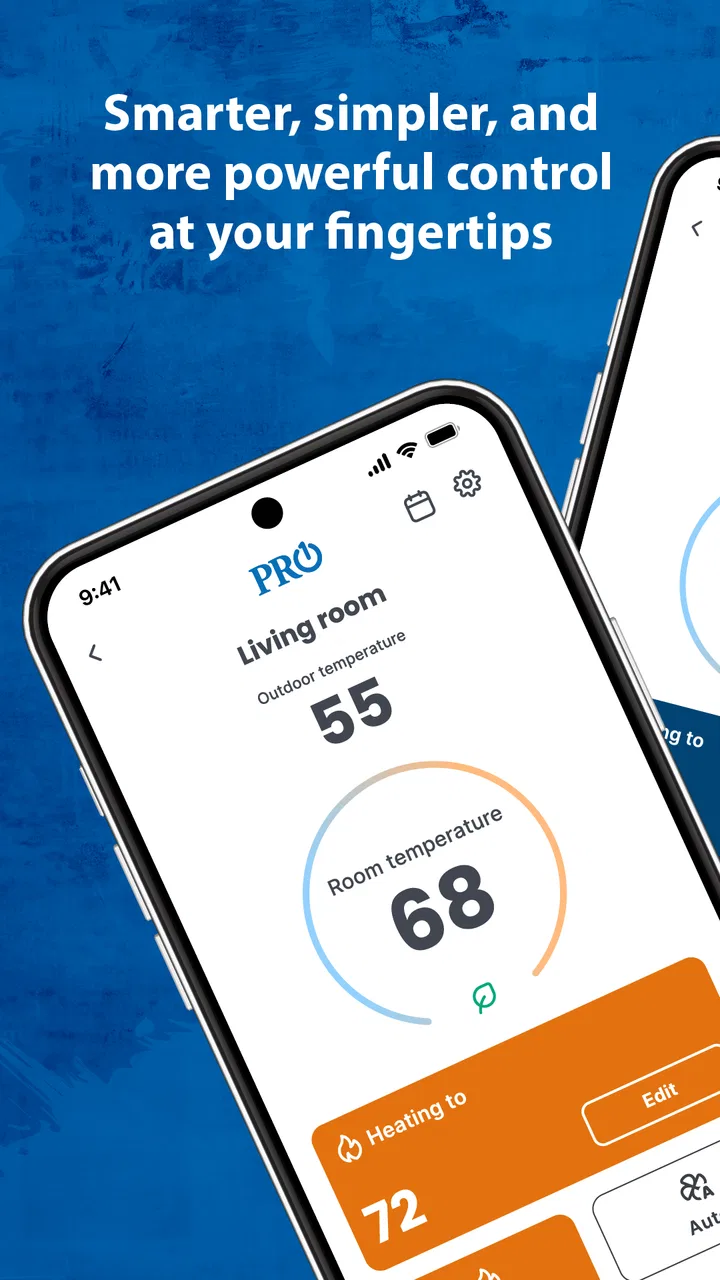
PRO1 Connect is a smart-home companion app designed to work with compatible PRO1 thermostats and related climate-control devices. After pairing your thermostat, the app can let you view the current room temperature, adjust heating or cooling settings, change operating modes, and manage schedules remotely. Its exact functions depend on the thermostat model, installed equipment, and the permissions enabled on your phone.
02Is PRO1 Connect compatible with every PRO1 thermostat?
No. PRO1 Connect is intended for selected Wi-Fi-enabled PRO1 products, so compatibility should be confirmed before downloading or attempting setup. The thermostat normally needs to support app connectivity and be connected to a compatible home network. Check the model number, installation documentation, or the manufacturer’s compatibility information, because older or non-connected thermostats may only work through their physical controls.
03How do I connect my thermostat to PRO1 Connect?
To get started, install PRO1 Connect, create or sign in to an account if required, and follow the in-app instructions for adding a device. You will generally need access to the thermostat, your home Wi-Fi password, and a phone with Bluetooth or location services enabled when requested. Keep the thermostat near a reliable router connection and carefully follow the pairing steps shown for your specific model.
04Can I control my home temperature remotely with PRO1 Connect?
Yes, remote control is one of the main reasons to use PRO1 Connect, provided the thermostat is online and correctly linked to your account. Depending on the model, you may be able to change the target temperature, switch between heating, cooling, and automatic modes, or review the device status while away from home. Remote commands can be delayed if the thermostat or internet connection is offline.
05Is PRO1 Connect free, and is it safe to use?
PRO1 Connect is generally available as a free download, although the compatible thermostat hardware and professional installation may involve separate costs. The app requires account and device information to provide remote control and synchronization features, so review its privacy policy and requested permissions before use. For safety, avoid changing settings beyond your equipment’s capabilities and contact a qualified technician for wiring or HVAC problems.
Pros
- Simple interface makes connecting with compatible devices easy.
- Supports quick access to essential connection and device information.
- Useful for managing PRO1-compatible hardware from one place.
- Lightweight app with minimal impact on device storage.
- Convenient for users who already own PRO1 products.
Cons
- Limited usefulness without a compatible PRO1 device.
- Some features may depend on the connected hardware model.
- Setup can be confusing if device permissions are denied.
- May offer fewer options than broader third-party connectivity apps.
- Performance and compatibility may vary across Android devices.

PRO1 Connect
Gallery